How to Pay the FESCO Bill?
 ✓Fact checked by: Editorial Team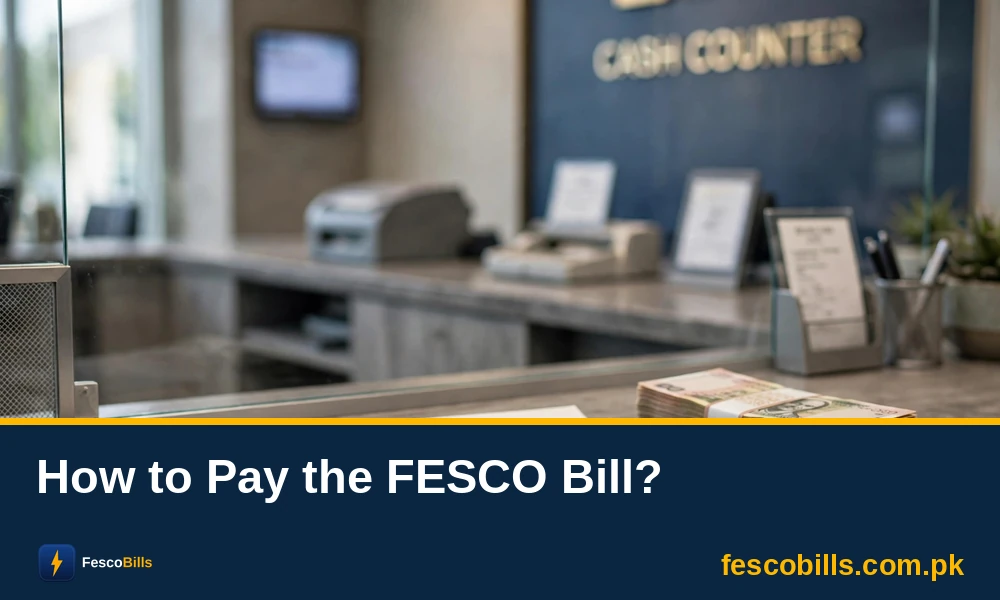
I still remember those days when you needed to stand outside the bank in a long queue just to pay the FESCO bill in the late 1990s. It was a very hectic job to pay the bill. And the worst part was that when you had the last day left, the queue doubled or tripled.
However, in 2026, we have very convenient ways to pay the FESCO bill. Now there is no need to stand and wait to pay the bill outside the bank’s window. You can pay your bills from the comfort of your home. Thanks to advancements in technology.
In this guide, I will let you know how you can pay your electricity bills without stepping outside of your home.
FESCO Bill Payment Methods (2026 Updated)
We are living in the age of AI and advancement, so the payment methods have changed. Thanks to mobile banking and digital mobile wallets, that provide the convenience of sending money and pay bills online.
Let’s find out how you can use mobile wallets like JazzCash and banking apps to pay your electricity bills online.
Pay FESCO With Mobile Wallets (JazzCash/EasyPaisa/Upaisa)
One of the quickest ways to pay the electricity bill is to use mobile wallets like JazzCash or EasyPaisa. Here is how to use them and pay your bills.
JazzCash Mobile App
JazzCash is Pakistan’s leading mobile wallet, trusted by over 48 million users, with 19.7 million active users every month, according to TMForum.
Nearly 40% of Pakistan’s population remains unbanked. JazzCash steps in with a mobile wallet that works just like a bank account, making financial services easy and accessible.
So use this app to pay your FESCO bill online.
1) Open Your JazzCash App
Go to your apps section on your mobile phone and open the JazzCash app. Make sure your JazzCash account has a balance to pay the amount of your bill.
2) Tap on the “Bill Payments” Icon
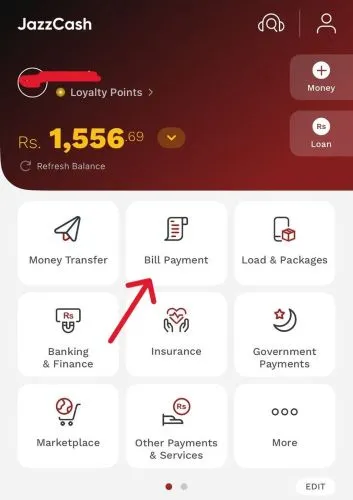
On the home screen of the app, you will see the “Bill Payments” icon. This will be right below the balance section. So tap on it, and it will open a new window.
3) Choose the “Electricity” Option
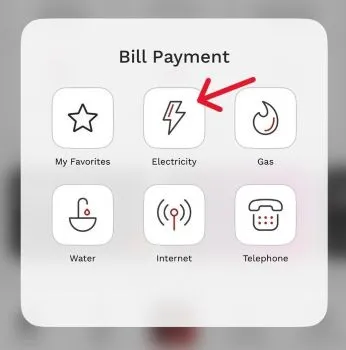
On the next window, you will see different options like Water, Gas, and Telephone. However, you need to choose “Electricity” from the options available there.
4) Pick “FESCO” As Your Electricity Company
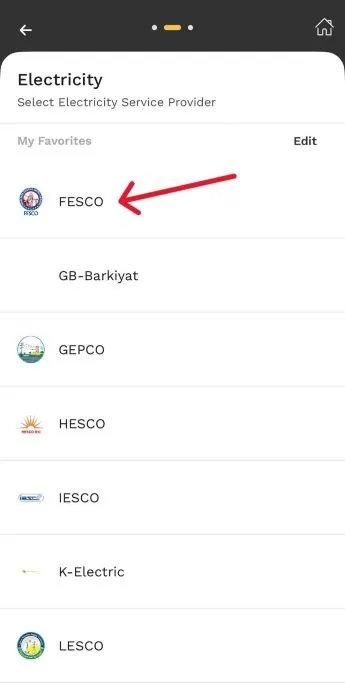
Now, you need to choose your company, which is FESCO. This is the company that you have to choose to pay your bill.
5) Enter Your “14-digit Reference Number” Inside the Blank Box
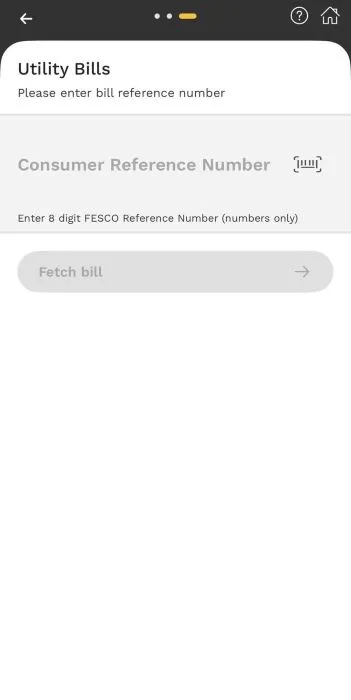
Now, a new screen will appear where you need to enter your 14-digit bill reference number inside the blank box. Check your bill and get this reference number from the upper left corner. Type this number and tap on the “Fetch Bill” button.
6) Review Bill Payment
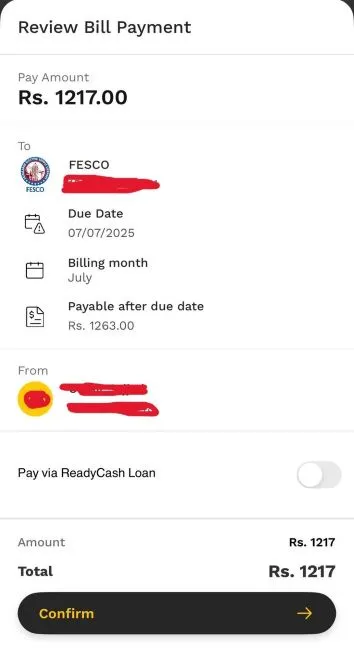
Once your billing details appear on the screen, you need to make sure that you are paying the right bill. Always check your name on the bill and the bill amount before you make a payment.
7) Pay the Bill
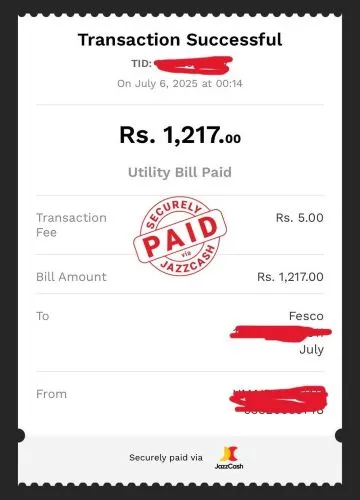
The last step is to tap on the “Confirm” button and enter your PIN to pay the bill. You will see the confirmation screen with the text “Transaction Successful”. It means your bill is now paid. Save this receipt for proof of payment.
Easypaisa Mobile App
Now, let’s find out how to pay the FESCO bill using the EasyPaisa mobile wallet app.
- Open the EasyPaisa mobile app.
- Go to “Bill Payment”.
- Now choose “Electricity”.
- Find your bill company, which is “FESCO”.
- Enter your 14-digit reference number in the required space.
- Fetch the billing details and amount.
- Now pay the bill and get the receipt.
Pay FESCO Bill Using Banking Apps
You can use any banking app to pay the FESCO bill. All Pakistani banks offer the facility to pay the FESCO bill or any other electricity bill. However, here is an overview of how you can pay your FESCO bills with mobile banking apps.
- Open your preferred bank account app.
- Now, log in to your account with a username and password.
- Go to the “Utility Bills” section.
- Choose the “Electricity Bill” option.
- Look for the “FESCO” company name and choose it.
- Enter your 14-digit billing reference number.
- Get your bill payment details and confirm them.
- Pay the amount.
- Get the e-receipt.
How to Pay Your Electricity Bill Without Any Mobile Wallet or Banking App?
If you don’t have a mobile wallet or bank account to pay the FESCO bill, then you can choose the traditional ways to pay the bill. Yes, you need to visit the bank in person to pay your bills. Follow the steps.
- Visit your nearest bank and bring your FESCO bill with you.
- Enter the bank and proceed to the bill payment counter.
- Hand over the bill to the cashier and make the bill payment.
- The cashier will count the money and stamp the bill as paid.
The cashier will hand over a receipt to you with a stamp of the bank. This is your receipt to ensure that your bill is now paid.
How to Pay the FESCO Bill After the Due Date Has Passed?
If the bill payment due date has passed, you can not pay the bill online. You can only pay it through a bank or EasyPaisa or JazzCash mobile shops. However, you also need to pay the late payment charges if the due date has passed.
F.A.Q
Yes, some banking apps and mobile wallets like JazzCash and EasyPaisa offer auto-payment or reminder options. You can set up monthly bill reminders or schedule payments to avoid missing due dates.
If you enter the wrong 14-digit reference number, the payment may go to someone else’s account. Always double-check the number before confirming the payment. Most apps show the bill details before final confirmation, so verify the name and amount carefully.
Yes, JazzCash and EasyPaisa charge Rs. 5 to Rs. 10 for paying bills. However, banking apps do not charge any fee.
Yes, you can pay multiple FESCO bills using the same JazzCash, EasyPaisa, or bank app account.
If you’ve accidentally paid your bill twice, don’t worry. You won’t lose your money. The extra amount will be adjusted in your next month’s bill by FESCO, and your future bills will be reduced accordingly. However, you can not get a refund in cash.
Official sources & references
This guide was prepared and fact-checked against the following official sources:
- FESCO — Faisalabad Electric Supply Company
- PITC — Online Bill Portal
- NEPRA — National Electric Power Regulatory Authority