How to Apply for a FESCO “Change of Name” Application?
 ✓Fact checked by: Editorial Team
After purchasing a new property, you should always transfer the ownership of the FESCO meter to your name. But changing a name on FESCO requires a process that you need to know. Don’t worry if you don’t know how to do it. This simple step-by-step guide will help you.
We have explained the full process to change the name on an electricity meter. It applies whether you bought a house with an already installed meter or just purchased a meter separately. This guide is for both domestic and commercial consumers.
Apply for Change of Name on a FESCO Electricity Meter
FESCO consumers can change the name of the FESCO meter online. The government of Pakistan has introduced an online portal for the general public of Pakistan.
You can change the name, track the application status, pay, print or upload demand notices, and change the load or tariff using that portal.
The name of the portal is ENC (Electricity New Connection). The URL of the portal is https://enc.com.pk/.
Now, let’s find out how to change a name on an electricity meter in Pakistan.
1) Go to the Electricity New Connection (ENC) System Web Portal
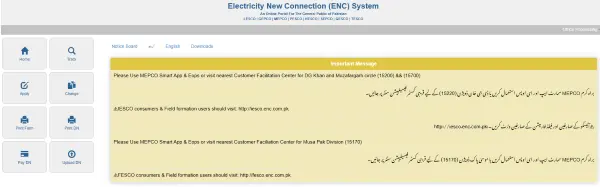
As we said earlier, the ENC is the portal where you can perform different tasks related to FESCO and other electricity companies like LESCO, GEPCO, MEPCO, PESCO, and HESCO.
So, pick up your smartphone and visit the portal https://enc.com.pk/.
2) Tap on the “Change” Button
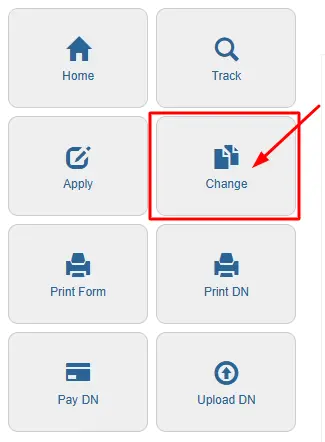
On the homepage of the portal, you will see different options on the left sidebar. The fourth option is “Change,” and this is your option. You need to tap on it, and it will load an application page.
The application name will be “Change Connection Name /Tariff /Load Application (Form Online)”. So this is the form that you need to fill out.
3) Fill Out the Application Form
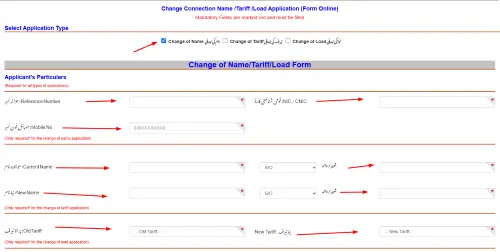
The last step is based on the application fulfillment. This is the step where you need to enter all the required details. So, make sure you have marked the right option on the form. There will be three options as below:
- Change of Name نام کی تبدیلی
- Change of Tariff ٹیرف کی تبدیلی
- Change of Load لوڈ کی تبدیلی
So you need to choose the “Change of Name نام کی تبدیلی” option and then start filling the form with the following details.
- Reference Number: حوالہ نمبر
- NIC / CNIC: قومی شناختی کارڈ
- Mobile No: موبائل فون نمبر
- Current Name: موجودہ نام
- شوہر / والد
- New Name: نیا نام
- Old Tariff: پرانا ٹیرف
- New Tariff: نیا ٹیرف
- Sanctioned Load(In kW): منظور شدہ لوڈ
- New Load(In kW): نیا لوڈ
Once you have entered these details, you need to upload the attested copies of:
- CNIC of the new owner
- Previous FESCO bill
- Proof of ownership
Agree to all the terms and conditions and tap on the “Submit” button. Your application will be submitted, and you can track your application status to check its current status.
How to Track the Change of Name Application Status?
Once your application is completed and submitted, your next job is to check the status of your application. You need to check whether your application for the name change is approved or pending.
So here is the guide:

- Go to the ENC website.
- Tap on the “Track” button on the left sidebar.
- This will open a new page where you need to choose your company.
- In this case, you need to choose “FESCO” and then enter your Tracking ID or CNIC number.
- Tap on the “Submit” button and check the real-time status of your application.
How to Solve Common Issues During the “Change of Name” Application Process?
1) Incorrect Reference Number
You entered the wrong reference number on the form.
Solution:
Check the reference number on your latest FESCO bill. It is usually written on the top left side of the bill. Make sure you enter the correct 14-digit number without any spaces.
2) Missing or Unclear Documents
You uploaded unclear or incomplete documents (like a CNIC copy or proof of ownership).
Solution:
Scan your documents properly. Make sure they are clear and readable. Only upload attested copies. If your file is too large (more than 300 KB), resize it before uploading.
3) Form Not Submitting
You filled out the form, but it is not submitting.
Solution:
Double-check all fields. Make sure you have selected the correct option (Change of Name). Also, check if you missed any required fields. Use a stable internet connection and try again.
4) Forgot Tracking ID
You forgot or lost your tracking ID after submitting the application.
Solution:
If you used your CNIC during submission, you can track the application using your CNIC number on the ENC website. Visit https://enc.com.pk/, click “Track”, select FESCO, and enter your CNIC.
F.A.Q
You must change the name to match the new owner’s details. It helps avoid legal or billing issues in the future.
Yes, you can visit your nearest FESCO office and apply manually. But it’s easier and faster to apply online using the ENC portal.
Usually, it takes 7 to 15 working days. You can track your application status online through the ENC website.
Official sources & references
This guide was prepared and fact-checked against the following official sources:
- FESCO — Faisalabad Electric Supply Company
- PITC — Online Bill Portal
- NEPRA — National Electric Power Regulatory Authority